Open topic with navigation
View Client Scores
When clients complete and submit their questionnaire, scores are recorded in the View Scores section
of the tool. Advisors can adjust or add a score that will override the client score. View client Score and view and set e score from the page.
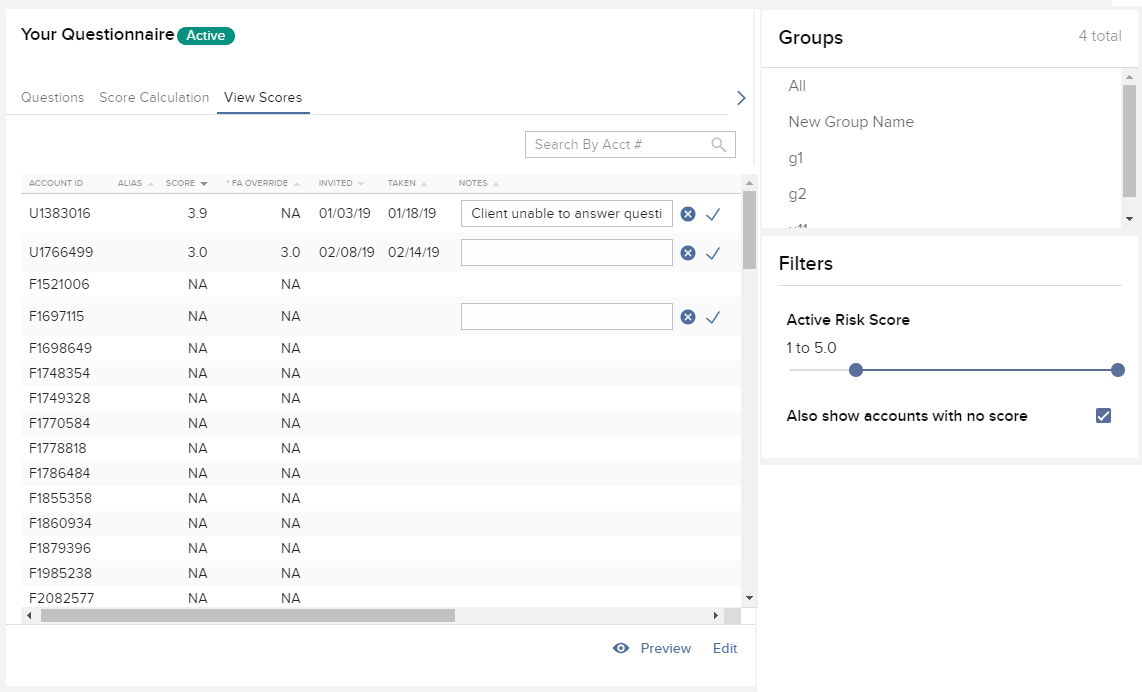
To view scores
1. In the Questionnaire Editor, select View Scores. Client scores are displayed in the table.
- If needed, use the filter panel on the right side of the screen to filter viewable scores.
- Check "Also show accounts with no score" to view all accounts that have no client or FA Override score.
- Use the Notes field to enter comments about the account, as needed. Use the check to save a note. Use the "x" to delete a note.
- If you would like to periodically refresh your clients’ risk scores, you can send an invitation for them to re-take the questionnaire at any time.