Open topic with navigation
Changing Account Representatives
Fully Disclosed Broker Master Users can view and change the Account Representatives for their clients from the client account details page. An Account Representative is a person who manages the relationship between a broker and his or her client(s). Fully Disclosed Brokers can assign one or more Account Representatives to a single client.
To change the Account Representative for an open or pending client account
- Click Manage Clients > Accounts > View > Summary, then click an individual client account on any tabbed page.
or
Click Manage Clients > Accounts > View > Open or Manage Clients > Accounts > View > Pending, then use the Account Selector to select an individual account.
The client account details page opens.
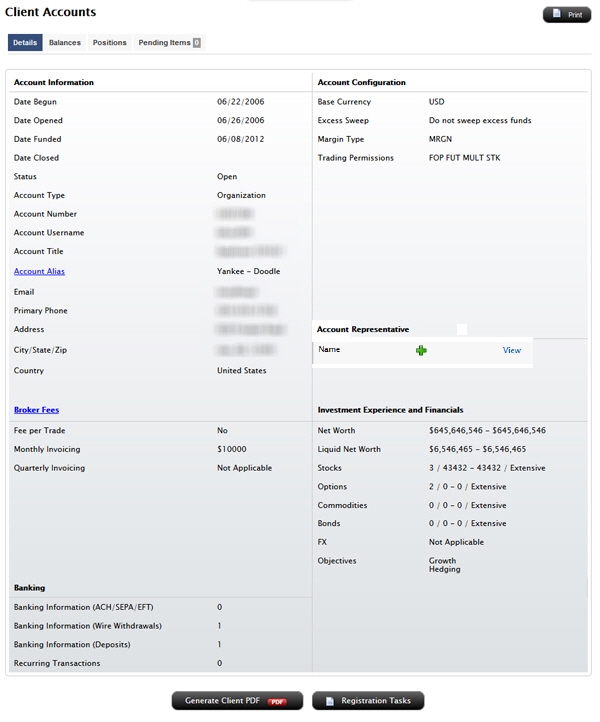
- To view the Account Representative(s) assigned to the client, click the View link in the Account Representatives section.
- To change the Account Representative(s) assigned to the client section, click the plus sign icon.
The Edit Account Representative window opens.
- If you have users who are designated as Account Representatives, they will be listed in the Account Representatives box.
- Click Add to assign the Account Representative to the new client.
- Enter an allocation percentage, which must total 100%. If you assign one Account Representative, then the allocation will be 100. If you assign more than one Account Representative to the new client, the total allocation must add up to 100%.If you change your mind, click the X to remove the Account Representative from the new client.
- If you want the Account Representative(s) to appear on the client's statements, click the check box.
- If a specific Account Representative is not listed in the drop-down, click the X to close the window, then add one by designating an account user as an Account Representative using the Manage Account > Access Rights > Users page.
- Click Submit.
For more information