Open topic with navigation
Add a Fund Account or an SMA Account
Fund Investment Managers with Multiple Hedge Fund accounts can add Fund accounts and can add Separately Managed Accounts (SMAs) to their account.
To add a Fund Account
- Click Manage Funds > Funds > Create > New.
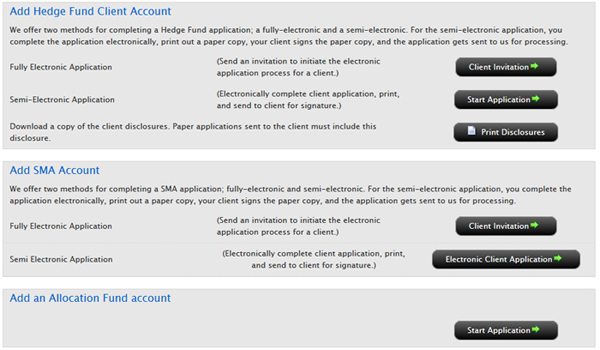
- In the Add Hedge Fund Account section, click the button that corresponds to the type of application you wish to begin:
- Fully Electronic Application - Click Client Invitation to initiate the electronic application process for a fund account.
- Semi-Electronic Application - Click Start Application to begin the semi-electronic application process.
- Complete the application process as required.
To add a Separately Managed Account
Before you can add a client SMA account, you must qualify to trade Securities Products, Commodities Products, and/or Forex Contracts. You must qualify for at least one set of products.
- Click Manage Funds > Funds > Create > New.
- In the Add SMA Client Account section, click the button that corresponds to the type of application you wish to begin:
- Fully Electronic Application - Click Client Invitation to initiate the electronic application process for an SMA client account.
- Semi-Electronic Application - Click Electronic Client Application to initiate the electronic application process.
- The Advisor Qualifications page opens. Before you can add a client SMA account, you must qualify to trade Securities Products, Commodities Products, and/or Forex Contracts. You must qualify for at least one set of products.
Select at least one set of products to trade and complete that section of the page, then click Continue.
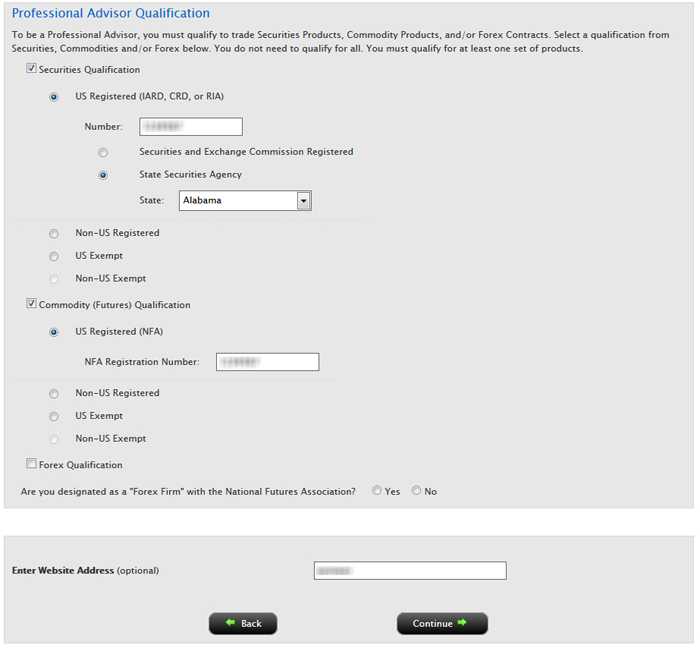
Once your request has been processed, you can add Separately Managed Accounts.
- Once you are qualified to trade Securities Products, Commodities Products, and/or Forex Contracts, log back into Account Management and click Manage Funds > Funds > Create > New, then click the appropriate button to begin a fully electronic, semi-electronic or paper SMA client account application.